As analytics workflows become more automated, reusable SQL becomes increasingly important. Parameterized queries help BigQuery users build scalable reporting systems without constantly rewriting query logic.
If you spend time working in BigQuery, you've probably written queries with hardcoded values like this:
SELECT *
FROM `a_great_project.ga4_drop.events`
WHERE event_date >= '2026-05-01'
 AND country = 'US'
Every time you need a different date range, campaign, or region, you have to edit the SQL itself. This is where parameterized queries become extremely useful.
Parameterized queries allow you to pass dynamic values into SQL, making your workflows cleaner, safer, and easier to automate.
For analytics teams working with recurring reports, dashboard filters, APIs, or production pipelines, parameterization should be considered a standard BigQuery best practice.
What Are Parameterized Queries?
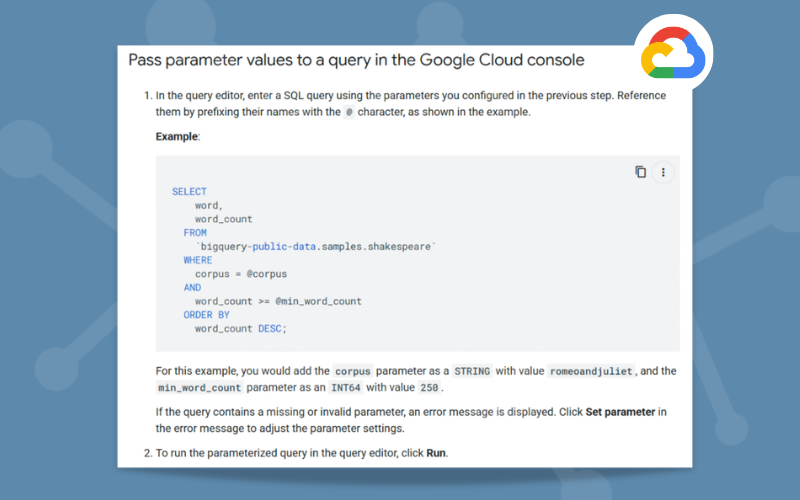
A parameterized query replaces hardcoded values with placeholders.
Instead of writing this:
WHERE country = 'US'
Write this:
WHERE country = @country
The @country value gets passed into the query separately at runtime.
Think of it like a function:
query(country="US")
The SQL logic stays the same while the input changes dynamically.
BigQuery supports both:
- Named parameters
- Positional parameters
Named Parameters
Named parameters use the @ symbol followed by an identifier.
Example:
SELECT *
FROM `a_great_project.ga4_drop.events`
WHERE country = @country
Positional Parameters
Positional parameters use ? placeholders.
Example:
SELECT *
FROM `a_great_project.ga4_drop.events`
WHERE country = ?
A query can use either named parameters or positional parameters, but not both simultaneously.
Why Use Parameterized Queries?
Reusable SQL
Parameterized queries let you reuse the same SQL across multiple scenarios without rewriting logic.
You can run the same query for:
- Different date ranges
- Countries or regions
- Campaign IDs
- Customer IDs
- Development vs production environments
Instead of maintaining multiple versions of the same query, you can simply swap parameter values dynamically.
Cleaner Automation
Parameters work extremely well with automated workflows and production analytics systems.
Common integrations include:
- Scheduled queries
- Stored procedures
- Python scripts
- BI tools
- ETL pipelines
- Orchestration frameworks
Instead of dynamically rewriting SQL strings in code, your automation layer simply passes different parameter values into a stable query template.
For example, many reporting pipelines dynamically pass a reporting date into a query:
WHERE event_date = @run_date
This keeps SQL templates stable while allowing automation systems to control execution dynamically.
Improved Security
Parameterized queries also help reduce SQL injection risks because values are handled separately from the SQL logic itself.
This is particularly important when query values originate from:
- User inputs
- Forms
- Internal tools
- Dashboards
- APIs
For organizations building customer-facing reporting systems or internal analytics applications, parameterization is an important security best practice.
Common Analytics Use Cases
Parameterized queries are especially valuable for analytics engineering and reporting workflows.
Dynamic Reporting
WHERE event_date BETWEEN @start_date AND @end_date
Use it for: dashboards, recurring reports, and automated exports.
Campaign Filtering
WHERE campaign_id = @campaign_id
Use it for: building reusable marketing performance reports.
Threshold-Based Analysis
WHERE revenue > @minimum_revenue
Use it for: segmentation, KPI monitoring, and alerting workflows.
Mistakes to Avoid
One of the most common misconceptions is assuming parameters can replace SQL structure components.
Parameters are intended for dynamic values, not dynamic SQL structure.
For example, this wouldn't work:
SELECT * FROM @table_name
Parameters should typically be used for:
- Dates
- IDs
- Thresholds
- Regions
- Campaign names
- Filter values
Trying to parameterize table names, column names, or SQL keywords leads to unnecessary complexity and harder-to-maintain workflows.
Best Practices for Scaling Reporting Workflows
Standardize Query Templates
Reusable query templates help teams maintain more consistent reporting logic across dashboards, pipelines, and environments.
This improves governance while reducing maintenance overhead.
Avoid Manually Concatenating SQL
Building SQL strings dynamically inside scripts or applications can quickly become difficult to maintain.
Parameterized queries provide a cleaner and more scalable approach.
Build for Automation Early
Even if a query starts as a one-time analysis, parameterization makes it easier to operationalize later inside dashboards, scheduled reports, or APIs.
Teams that standardize parameterized SQL early often build more scalable reporting systems over time.
Final Thoughts
Parameterized queries are one of the simplest ways to improve the quality and scalability of your BigQuery workflows.
They help you:
- Write reusable SQL
- Improve query security
- Simplify automation
- Standardize reporting logic
- Reduce maintenance overhead
As analytics stacks become more automated and production-focused, parameterization becomes increasingly important.
For analytics engineering, dashboarding, API integrations, and scalable reporting systems, parameterized queries should be considered a core BigQuery best practice.
Need help building scalable BigQuery reporting workflows, automated dashboards, or production-ready analytics pipelines?
Calibrate Analytics helps teams streamline data infrastructure, automate reporting, and improve analytics visibility across your organization.
For more BigQuery tips, check out these related articles: